[SYSTEM_STATUS] Module: Uplink Initialization Security: Hybrid (Web2 & Web3) / Encrypted Client Access: Wallet, Web, Mobile, Telegram
1. The Hybrid Uplink Protocol
Establishing a secure uplink is the first critical step for any Architect entering the MNDSET AI ecosystem. To ensure maximum accessibility, the Neural Interface utilizes a Hybrid Authentication Architecture. This allows both Web3 natives and traditional Web2 users to seamlessly connect their cognitive profile to the Solana blockchain.
2. Supported Interfaces
The MNDSET Neural Interface is designed for continuous integration into your daily workflow, offering multi-platform accessibility to ensure your focus is never interrupted:
- Web Terminal: The primary dashboard for deep-work sessions, detailed data analysis, and hardware upgrades.
- Mobile Application: Optimized for on-the-go tracking, habit building, and rapid focus deployment.
- Telegram Mini-App: https://t.me/MndsetAIBot (opens in a new tab) Execute commands and interact with your AI co-pilot directly through our seamless Telegram integration.
3. Initialization Sequence
To connect your node to the network and begin mining, follow the hybrid initialization sequence:
Step 1: Authentication & Connection
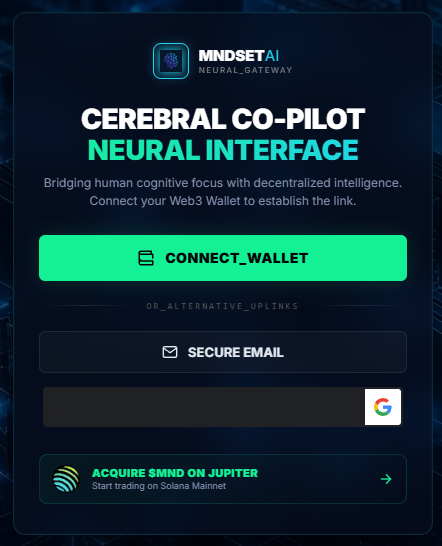
Select your preferred uplink method on the official terminal. MNDSET supports a fully hybrid login system:
- Web3 Native: Connect directly via WalletConnect, Phantom, or Solflare. The protocol will only request a signature to verify ownership—it will never ask for your private keys.
- Web2 SSO (Neural Wallet): Connect effortlessly using Google, Email, or Telegram [https://t.me/MndsetAIBot (opens in a new tab)]. The system will automatically provision a secure, non-custodial Neural Wallet for you, allowing you to receive $MND rewards and deposit SOL for upgrades without needing prior crypto experience.
Step 2: Profile Calibration
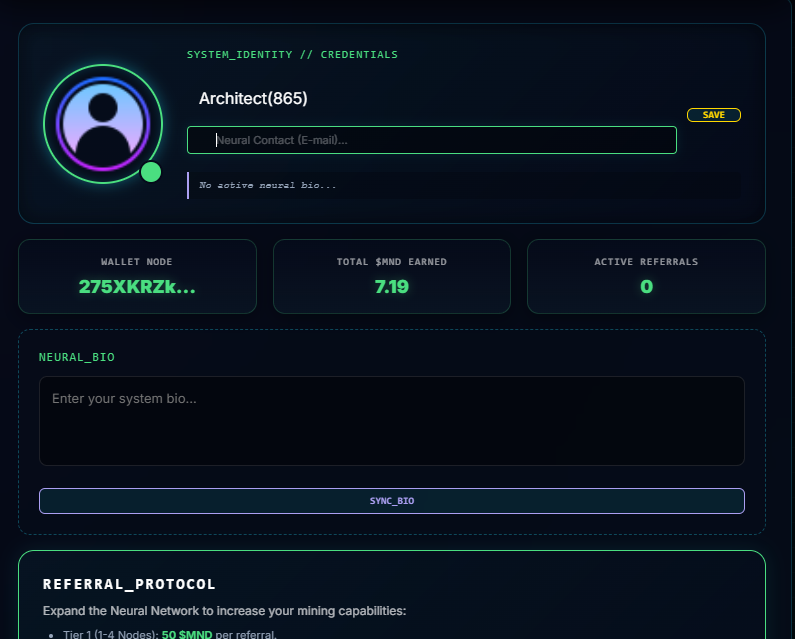
Upon connecting, you will be guided through an Onboarding Tutorial. This interactive guide introduces the focus-mining simulation and allows you to configure your, preferences, and personalize your bio.
Step 3: Neural Link Activation
Once calibrated, complete your initial tasks to earn your starter $MND allocation. Your Uplink is now active, and the AI Cerebral Co-pilot is ready to process your cognitive telemetry.
4. Security & Privacy
- Data Sovereignty: Your cognitive data (private journal entries, specific task details) remains entirely off-chain and encrypted. The blockchain only records the hashed proof of your focus duration and intensity.
- Contract Verification: The connection layer interacts exclusively with our audited Solana smart contracts. To prevent phishing attacks, always ensure you are connecting via the official
mndset.aidomain.