[SYSTEM_STATUS] Module: [WALLET LINK] Function: On-Chain Synchronization Network: Solana Mainnet
1. Vault Protocol Explanation
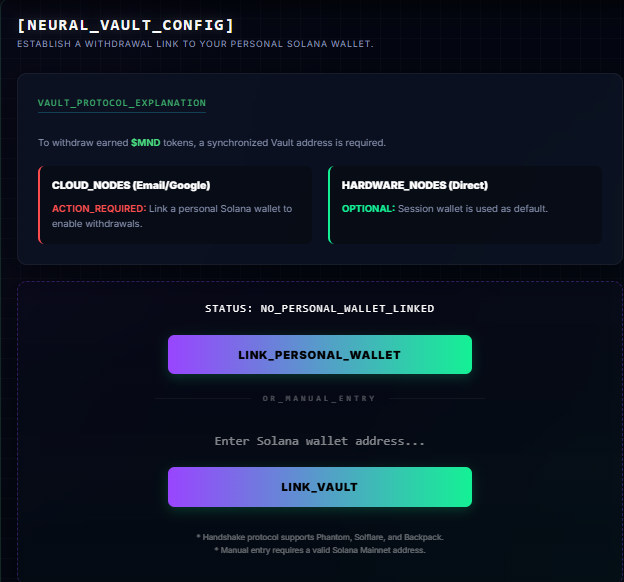
To bridge your earned $MND tokens from the internal terminal to the decentralized Solana Mainnet, a synchronized Vault address is required. The [WALLET_LINK] module is where you establish this secure withdrawal link to your personal Web3 wallet.
2. Node Classification
Depending on how you initialized your MNDSET session, the system categorizes your connection into two distinct node types:
- CLOUD_NODES (Email/Google): If you logged into the terminal using standard Web2 credentials, ACTION IS REQUIRED. You must link a personal Solana wallet to enable on-chain withdrawals.
- HARDWARE_NODES (Direct): If you connected to the platform directly using a Web3 wallet extension, linking is OPTIONAL. Your active session wallet is automatically designated as the default withdrawal destination.
3. Establishing the Withdrawal Link
For Cloud Nodes, or Hardware Nodes wishing to route withdrawals to a different address, the interface provides two secure synchronization methods:
A. Handshake Protocol (Direct Link)
Click the LINK_PERSONAL_WALLET button to initiate a secure Web3 handshake. This automated protocol natively supports major Solana wallets, including Phantom, Solflare, and Backpack.
B. Manual Entry
If you prefer to route your assets to a cold storage vault or an address not currently active in your browser, you can use the manual entry field. Simply paste a valid Solana Mainnet address and execute the LINK_VAULT command to lock in your configuration.